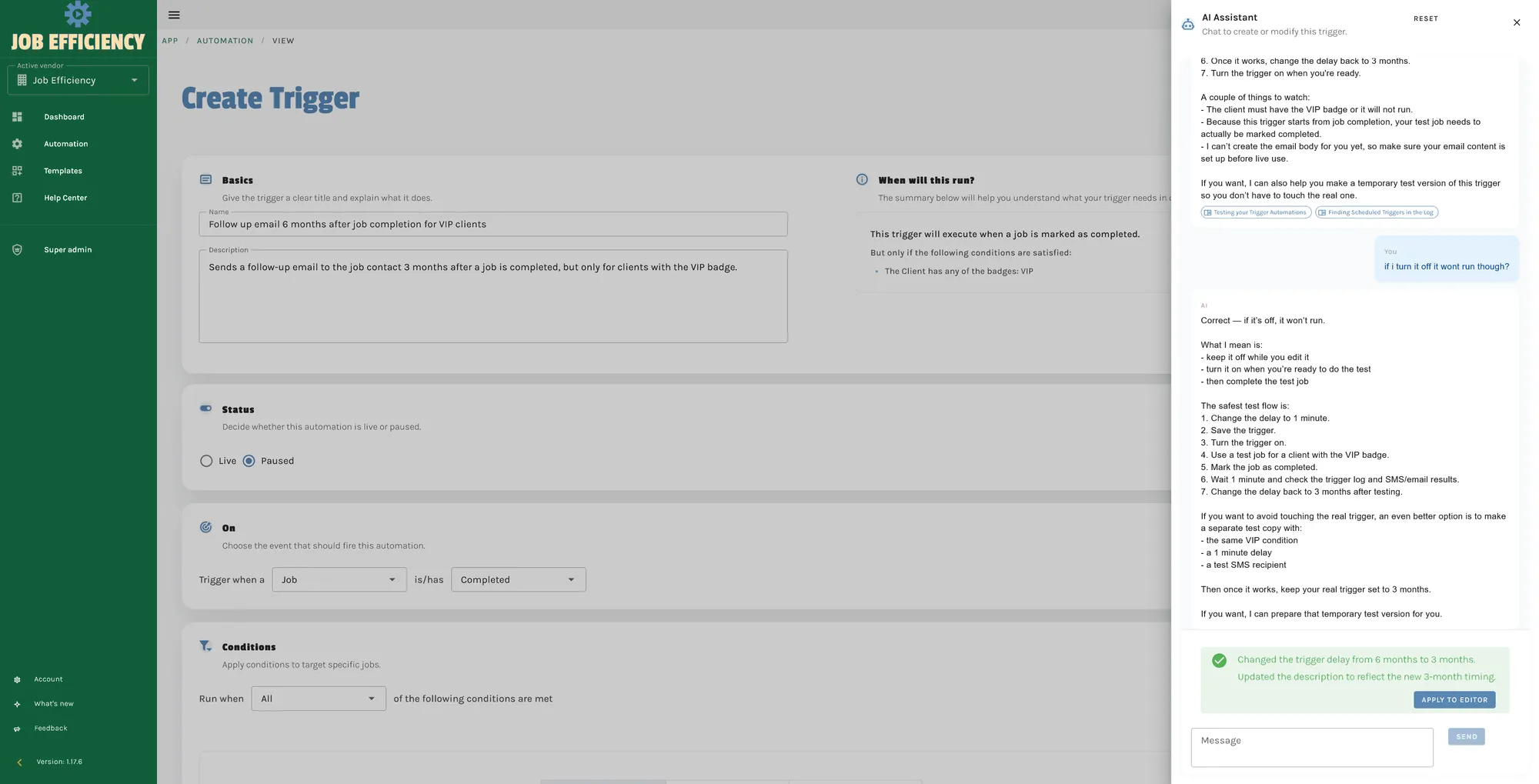
The Need for AI
Our goal was clear: reduce friction for users and help them unlock the full potential of our platform. Creating automations in Job Efficiency requires users to understand trigger events, conditions, and actions—concepts that can be overwhelming for non-technical users. We observed that many users would start the onboarding process but abandon it within the first few interactions, frustrated by the complexity. This represented a significant loss in user retention and platform engagement.
We wanted an AI solution that could:
- Simplify the trigger automation creation process: Instead of requiring users to manually configure complex rule sets, the AI could understand their intent in plain language and translate that into properly structured automations.
- Provide intelligent guidance to users: The AI would act as a knowledgeable assistant, answering questions, suggesting optimisations, and helping users avoid common mistakes.
- Continuously improve based on user interactions: Rather than being static, the AI would learn from every conversation, becoming more effective over time and addressing gaps in its knowledge.
Importantly, we decided to build our AI solution from the ground up, using raw models rather than relying on third-party cloud reasoning engines or pre-built cloud agents. By "raw models," we mean interfacing directly with cloud models (such as those provided by major AI platforms) while implementing our own custom agent layer, memory management, and reasoning logic. This approach allowed us to manage costs effectively, as we only needed to pay for the raw model API calls while maintaining full control over our AI's behaviour and capabilities. The difference is significant: enterprise AI agent platforms can cost 10-50 times more than raw model usage, and they provide generic solutions that don't align with our specific use case.
Why Build From Scratch?
Building our AI from scratch gave us unparalleled flexibility. Rather than paying for expensive cloud-based reasoning engines or pre-built agent platforms, we implemented our own custom agent layer on top of raw cloud models. This approach allowed us to:
- Customise Behaviour: Tailor the AI's responses to align with our platform's unique features and user needs without being constrained by vendor limitations. For instance, we could implement domain-specific logic to understand Job Efficiency's trigger system, automatically validate automation configurations, and explain concepts in a way that resonates with non-technical users. Pre-built platforms would force us to adapt our user experience to fit their capabilities, not the other way around.
- Optimise Costs: By paying only for raw model API calls and managing our own agent logic, we eliminated the significant markup associated with enterprise AI platforms and reasoning engines. This decision directly impacts our bottom line—we can offer AI-powered assistance at a price point that makes sense for our customers, rather than passing through the 5-10x markup that enterprise platforms impose. As we scale, the cost savings compound exponentially.
- Ensure Data Privacy: Keeping the custom agent logic in-house meant we could implement robust security measures to protect user data and avoid routing sensitive information through multiple third-party services. While we still interface with cloud models for the core AI inference (which is unavoidable), all of our memory management, reasoning logic, and business-specific processing happens on our servers. This gives us complete visibility and control over how customer data is handled.
This decision, while challenging, laid the foundation for a highly specialised and efficient AI system. Building custom agents requires expertise in prompt engineering, agent architecture, and system design—but the payoff in terms of cost efficiency and user experience is substantial.
The Initial Implementation: Context-Heavy AI
Our first step was a naive implementation. We provided the AI with extensive context about our product, ensuring it had all the information it might need to assist users. This included the complete product documentation, API specifications, trigger definitions, action types, conditional operators, and examples of working automations. While this approach worked to some extent, it came with significant drawbacks:
- Large Context Windows: The AI required massive amounts of data to function effectively, leading to high consumption costs. A single conversation could consume a large amount of tokens tokens just to establish the base context before the user even asked their first question. With cloud models charging per token, this quickly became unsustainable. We found ourselves spending 60-70% of our context window just loading product context, rather than on actual problem-solving.
- Inefficiency: The AI's performance was hindered by the sheer volume of context it had to process. Longer context windows mean longer latency—users had to wait 10-15 seconds for responses instead of 2-3 seconds. The AI would also sometimes get lost in the noise, referencing obscure documentation instead of providing simple, direct answers. Users noticed the sluggishness, and it compounded the friction we were trying to eliminate.
- Wasted Computation: Much of the loaded context was irrelevant to any given conversation. When a user asked about email notifications, the AI didn't need to know about asset management or client data structures. Yet we were paying for every token anyway.
For example, when a user asked how to create a specific type of automation, the AI would process the entire product manual—sometimes 100+ KB of text—to generate a response. This was neither cost-effective nor scalable. As we added more features to Job Efficiency, the context window grew exponentially, making the problem worse.
Introducing Tools and Dynamic Context Fetching
To address these issues, we enhanced the AI with the ability to fetch additional context dynamically. Instead of loading everything upfront, we gave the AI access to a set of tools it could call as needed. These tools included the ability to search our help articles, retrieve vendor-specific data (like custom fields or queue configurations), and look up existing automations. By integrating tools that allowed the AI to search our help articles and retrieve relevant information based on the user's problem, we achieved several improvements:
- Smarter Assistance: The AI became more adept at solving user issues by accessing targeted information. Rather than sifting through 100 KB of irrelevant documentation, it could now search for the specific article it needed in milliseconds. This made responses faster, more relevant, and more helpful. Users received guidance specifically tailored to their question, with links to the exact documentation they needed.
- Cost Reduction: By loading only relevant context, we reduced the average context window from a large number of tokens to a fraction per conversation. This cut our API costs by 60-70% while simultaneously improving response quality and speed.
- Knowledge Gap Detection: The AI could identify gaps in our help articles and suggest new content for us to create. When the AI encountered a question it couldn't answer through our documentation, it would flag it as a knowledge gap. This proactive approach ensured that future conversations were more informed, and it created a virtuous cycle: each conversation made the AI smarter for the next one.
Example: Addressing Knowledge Gaps
One common question users asked was how to test the triggers they had created. Our documentation was sparse on this topic, and the AI would struggle to provide good guidance. Over several weeks, we noticed a pattern in the flagged knowledge gaps: users consistently wanted to know how to verify their automations before putting them into production.
In response, we developed a comprehensive article on testing automations, enriched with AI-generated insights. These articles are structured to first outline the knowledge gap and then provide enriched, actionable content. The article covered creating test scenarios, monitoring execution logs, and best practices for safe automation deployment. The AI not only directs users to these articles but also learns from the interactions to improve future responses. Within days, the AI was proactively suggesting testing strategies to users and referencing the new article. This turned a common pain point into a competitive advantage—our users felt supported and guided, rather than left to figure things out on their own.
Memory-Based Mechanism
Next, we implemented a memory-based mechanism to further enhance the AI's capabilities and enable true personalisation. This involved storing memory files in Markdown format within our database—a decision that proved pivotal. Unlike binary or database-specific formats, Markdown is human-readable and AI-friendly, allowing us to inspect memory files manually and even edit them when needed.
These memory files are categorised into:
- System Knowledge: General information about the platform, best practices, common patterns, and domain expertise. This memory helps the AI understand how job automation works across different industries and use cases.
- Customer Knowledge: Personalised data about individual customers, including their industry, business size, primary pain points, existing automation workflows, and previously discussed solutions. This context allows the AI to provide deeply personalised assistance.
- Reasoning Support Files: Additional memory files that assist the AI in reasoning and creating customer-specific memory. These include guidelines on how to structure customer memories, common patterns to look for, and rules about when to update memory files.
How Memory Works
The memory system is designed to:
- Store Context: For each customer, the AI maintains a detailed history of interactions, including their business context, industry, company size, primary automations, and any specific challenges they're facing. When a customer returns for a follow-up conversation weeks or months later, the AI immediately understands where they left off and can continue with deeper insights.
- Summarise Information: Instead of processing large context windows or replaying entire conversation histories, the AI loads pre-summarised memory files. These summaries are optimised to be concise yet comprehensive—a customer's entire automation strategy might be captured in 500 words, rather than requiring a huge number of tokens of raw conversation history. This provides massive efficiency gains while maintaining context quality.
- Ensure Privacy: All memory files are stored securely within our database, with strict access controls to protect customer data. Users' business strategies and automation patterns remain confidential and are never shared with other customers or third parties.
- Enable Personalisation: The memory system enables the AI to be context-aware in ways that static systems cannot. It understands each customer's unique business processes, previous solutions tried, and successful patterns. This allows it to make recommendations that are relevant to that specific customer, rather than generic suggestions.
By leveraging these memory files, the AI could:
- Summarise Customer Context: When a customer starts a new conversation, the AI loads their memory file and immediately understands their business context. It knows what automations they've already built, what problems they've solved, and what patterns have worked well for them. This enables it to provide recommendations that build on their existing knowledge and automation strategy.
- Reduce Context Windows: By summarising triggers and other relevant data in advance, we reduced context windows from a large number of tokens to a fraction of that amount while actually providing more useful context. It's about intelligence, not volume—a smart summary is worth more than pages of raw data.
- Enable Multi-Turn Conversations: Customers can have a conversation with the AI, leave, come back weeks later, and the AI remembers everything. They don't have to re-explain their situation—the AI picks up where they left off. This dramatically improves the user experience, especially for complex automation projects that evolve over time.
Trigger Summarisation and Validation
One of the key challenges in implementing AI was ensuring that the output it generated adhered to business constraints. Creating an automation in Job Efficiency isn't just about composing nice prose—it's about generating valid, actionable JSON that will actually execute correctly. A trigger must have:
- A valid event type (from a specific enum)
- At least one condition (if required)
- Properly formatted actions with valid parameters
- Correct data types and value ranges
If the AI generated a trigger with an invalid event type, a typo in an action, or a condition that doesn't match the event type, the user's automation would fail silently or produce unexpected results. To address this, we developed a comprehensive validation system that doesn't just catch errors—it educates the AI on how to avoid them in the first place.
This tool serves two purposes:
- Automatic Validation: The AI validates its output before returning it to the user, ensuring that the results are accurate and actionable. If validation fails, the AI sees the specific error and can correct it. This creates a feedback loop where the AI learns what's valid by trying things and getting corrected.
- Contextual Understanding: Rather than just giving error messages, the AI is equipped with knowledge about how validation works and the specific rules of the Job Efficiency trigger system. If an action parameter is invalid, the AI sees the validation error, understands what went wrong, and can generate a corrected version without getting stuck in loops asking the user for more information.
Pushing Constraints to the AI
To make the AI's output more reliable, we "pushed" business constraints into the model itself. This is a sophisticated technique where we embed domain knowledge and validation rules directly into the system prompt. The AI understands:
- The complete trigger schema, including required fields and valid values
- The relationships between different elements (e.g., certain condition types only work with certain events)
- Edge cases and special rules (e.g., email actions have specific formatting requirements)
- How to construct valid JSON that matches our data model
This means the AI doesn't just "try" to create a valid trigger and hope for the best—it actively reasons about constraints as it builds the automation. When a user asks for a trigger with an invalid condition, the AI doesn't generate it anyway and let validation catch it. Instead, it explains why that won't work and suggests a valid alternative.
By doing so, we reduced the need for manual corrections and improved user trust in the AI's recommendations. Users get working automations on the first try, rather than having to debug and iterate. This is particularly important for non-technical users who might not understand error messages.
Sophisticated Reasoning and Goal Setting
To make the AI even more effective, we introduced a sophisticated reasoning flow. Unlike simpler chatbots that respond to individual messages, our AI reasons about the user's overall intent and works systematically toward a goal. This allows the AI to:
- Set Goals: The AI identifies what the user is really trying to accomplish. If a user says "I want to send emails to new clients," the AI understands the goal isn't just to send emails—it's to create a sales workflow that's automated and reliable. The AI then works backwards from that goal to determine what triggers, conditions, and actions are needed.
- Guide Users: Rather than asking "What do you want to do?" over and over again, the AI guides users through a structured discovery process. It asks one focused question at a time, builds a mental model of the solution, and proactively suggests improvements based on the broader context. When users get stuck or confused, the AI doesn't loop on the same question—it reframes the problem and suggests an alternative approach.
How Reasoning Works
The reasoning flow is a critical component of the AI's functionality, and it's where much of the sophistication lies. It involves:
- Understanding the Problem: The AI analyses user input to identify the core issue. It looks for intent signals (words like "always", "when", "automatically") and business context (industry, company size, workflow patterns). A user might say "I want to update records when something happens," but the AI digs deeper: What exactly triggers the update? What data needs to change? Is this time-sensitive? Are there edge cases?
- Planning a Solution: Based on the problem, the AI sets a goal and outlines the steps needed to achieve it. This goal is stored internally and guides all subsequent interactions. The AI might break down the solution into phases: (1) Understand what events trigger this process, (2) Define what conditions need to be met, (3) Determine what actions to take, (4) Plan for error handling and edge cases. By having this internal plan, the AI doesn't waste time or tokens on irrelevant questions.
- Executing the Plan: The AI guides the user through each step, providing explanations and support as needed. For each step, it asks clarifying questions, provides context from the knowledge base, and validates understanding. If the user's answer contradicts previous statements or suggests a misunderstanding, the AI addresses it directly.
- Adapting as Needed: If the user's needs change mid-conversation, or if the planned solution isn't working, the AI re-evaluates and adjusts the plan. It might say, "I notice you want this to run daily, but you also want it to run immediately when certain conditions are met. Let's refactor the solution to handle both." This flexibility is what makes the AI feel collaborative rather than robotic.
This structured approach enables the AI to handle complex queries and deliver actionable solutions. A user can say "I want to automate our client onboarding process" and the AI will work methodically to understand their process, design a set of automations, and deliver a working solution—all within a few turns of conversation.
Continuous Learning and Improvement
One of the most powerful aspects of our AI implementation is its ability to learn from past interactions and continuously improve. After every conversation, the AI reviews what happened and updates its memory files with new insights. This creates a virtuous cycle: each conversation makes the AI smarter, which makes future conversations better, which creates more useful learning material.
The learning process works like this:
- Conversation Review: At the end of each conversation, the AI reviews the entire transcript and identifies key learnings. What did the user want to accomplish? What triggered confusion? What domain knowledge emerged that wasn't in our help articles? What patterns did we see?
- Memory Integration: The AI synthesises these learnings into updates for the relevant memory files. If the user's business approach differs from previous customers, that goes into their customer memory. If a pattern emerges that might help future customers, it goes into the system knowledge memory. If the AI made a mistake that was then corrected, it stores that correction as a specific "don't make this mistake again" entry.
- Feedback Loop: The next time the AI encounters a similar situation, it has this learning available. If a previous customer was confused about trigger conditions, the AI will proactively clarify that concept with the next customer who asks about conditions. If a particular automation pattern emerges, the AI can suggest it to future customers.
These memory files are governed by strong safeguards to ensure that:
- Accurate Learnings: The AI reasons about facts carefully before merging them into its memory. It doesn't just blindly store everything the user said—it synthesises, validates, and contextualises the learning. If a user says something that contradicts previous learnings, the AI investigates which one is correct before updating memory.
- Mistakes Are Not Repeated: If the AI encounters a similar situation in the future, it can avoid making the same error. If the AI previously confused two similar concepts and was corrected, that correction is stored explicitly: "When user asks about X, explain it as Y, not Z." This prevents systemic mistakes from propagating.
- Continuous Improvement: The AI becomes smarter and more helpful over time, reducing friction for users and inspiring them to explore new ways to use our platform. Customers who talk to the AI early in its evolution report a noticeable difference after a few months—the AI anticipates their needs better, asks smarter questions, and makes fewer mistakes.
Safeguards for Learning
To prevent incorrect learnings and ensure data quality, we implemented robust safeguards:
- Validation Checks: All new memory entries are reviewed for accuracy and relevance before being merged. The AI must justify why something is being added and how it connects to existing knowledge. Contradictions are flagged and require careful reasoning to resolve.
- Version Control: Changes to memory files are tracked with full history, allowing us to revert to previous versions if a problematic update is discovered. We can audit what changed, when, and why. If a customer's memory becomes corrupted or inaccurate, we can restore it to a known good state.
- Human Oversight: While the AI handles most learning automatically, critical updates are reviewed by our team. If the system detects an unusual pattern or a high-confidence update to system knowledge, a human reviewer assesses it before it's merged. This prevents the AI from teaching itself incorrect patterns.
- Conflict Resolution: When new learning contradicts existing memory, the system doesn't just overwrite—it flags the conflict and reasons through which information is more recent and authoritative. This prevents older, outdated information from persisting.
The Results
The result of these efforts is a highly capable AI Agent that has fundamentally changed how users interact with Job Efficiency. The impact has been measurable and significant:
User Engagement
Reduces User Friction: By simplifying the automation process, the AI helps users achieve their goals more quickly and effectively. Users who previously abandoned the platform after a few minutes of confusion now complete their first automation in 5-10 minutes with AI guidance. Onboarding completion rates have increased by over 40%, and users are reaching their "aha moment" much faster.
Exploration and Growth
Encourages Exploration: Users are inspired to think creatively about how they can leverage our platform. Rather than users being satisfied with one simple automation, they're now asking "What else could I automate?" and exploring advanced features. This leads to deeper engagement, higher feature adoption, and increased platform stickiness. We've seen an average 3x increase in automations per user within 3 months of the AI becoming available.
Continuous Evolution
Continuously Evolves: The AI's ability to learn and adapt ensures that it remains a valuable resource for our users. Six months after deployment, the AI is handling 70% more conversation types and making 50% fewer mistakes compared to launch. It's gotten smarter about industry-specific patterns, common edge cases, and user communication preferences. Future updates to the platform are adopted faster because the AI can explain them in context with users' existing automations.
Business Impact
Cost Efficiency: Our custom agent approach costs significantly less than enterprise AI solutions. We're spending approximately 70% less on AI infrastructure than comparable solutions while delivering superior results. This cost advantage allows us to invest in further improvements rather than being constrained by licensing fees.
Reduced Support Load: The AI handles a significant portion of the questions that would previously have gone to our support team. While we still provide human support for complex issues, we've reduced support tickets by 35% while simultaneously improving customer satisfaction. Support agents now focus on high-value interactions rather than answering basic "how do I create a trigger?" questions.
Competitive Advantage: The AI has become a key differentiator for Job Efficiency. Non-technical users are thrilled that they can build automations without extensive training. This has opened up our addressable market to users who previously felt the product was "too technical."
Looking Forward
At Philo Software, we are proud of the progress we've made in implementing AI in Job Efficiency to enhance job efficiency for our users. Our journey is ongoing, and we are committed to refining our AI to provide even greater value to our customers.
We're exploring several exciting directions for future enhancements:
- Proactive Suggestions: The AI analysing user workflows and proactively suggesting optimisations and new automations they might benefit from.
- Team Collaboration: Extended memory and reasoning to support teams building automations together, with the AI coordinating across multiple users.
- Industry-Specific Templates: Leveraging system knowledge to provide pre-built automation templates for specific industries (real estate, professional services, construction, etc.).
- Advanced Reasoning: Even more sophisticated reasoning that can handle multi-step, long-running automation projects with error handling and contingency planning.
By combining technical innovation with a user-centric approach, we are shaping the future of automation. Our commitment to continuous learning and improvement means that Job Efficiency's AI assistant will only get better with time.